Nginx安装完毕后,会产生相应的安装目录,根据前面的安装路径,Nginx的配置文件路径为/usr/local/nginx/conf,其中nginx.conf为Nginx的主配置文件。这里重点介绍下nginx.conf这个配置文件。
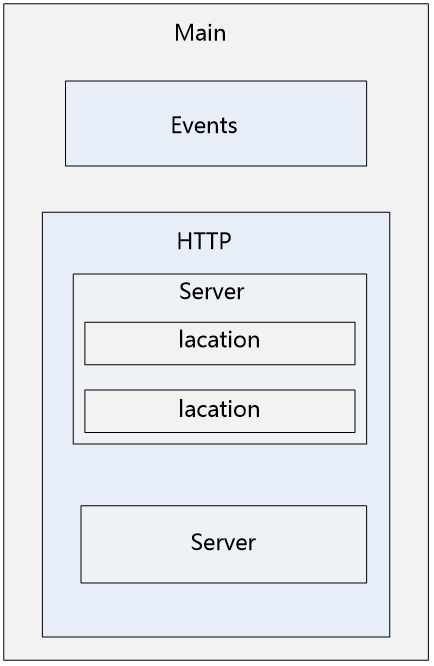
Nginx配置文件默认有五个部分组成:分别是main、events、http、server和location,其中,main部分设置的指令将影响其他所有设置;events部分用来配置影响nginx服务器或与用户的网络连接;http部分可以嵌套多个server,主要用来配置代理,缓存,自定义日志格式等绝大多数功能和第三方模块的配置,server部分用于配置虚拟主机的相关参数;location部分用于配置请求的处理规则,以及各种页面的处理情况。这五者之间的关系是:main与events平级,一个http中可以有多个server,server继承main,location继承server。
你总结得很准确。Nginx 的配置文件(通常是 nginx.conf)确实是层级嵌套的结构,由你提到的这五个核心部分组成。这种设计让 Nginx 配置既清晰又灵活。
下面我用最直观的方式,帮你把这五个部分的关系和作用彻底理清:
配置文件结构层级图
可以把 Nginx 配置想象成 “俄罗斯套娃” 的结构:
main                                # 全局配置层
│
├── events                          # 事件驱动配置层
│
└── http                            # HTTP核心配置层
    │
    ├── server                       # 虚拟主机(网站)配置层
    │   │
    │   ├── location /               # URL匹配规则层
    │   │
    │   └── location /images
    │
    └── server                       # 可以定义多个虚拟主机
        │
        └── location /api
一、main(全局块)
位置:配置文件最外层,大括号外
作用:设置全局生效的指令,影响 Nginx 整体运行
常见配置:
user  nginx;                 # 工作进程运行的用户
worker_processes  auto;       # 工作进程数(通常为CPU核心数)
error_log  logs/error.log;    # 错误日志位置
pid        logs/nginx.pid;    # 进程ID存放文件
二、events(事件块)
位置:main 块内部,http 块之前
作用:配置 Nginx 连接处理机制,影响并发性能
常见配置:
events {
    worker_connections  1024;       # 单个进程最大连接数
    use epoll;                      # 使用高效事件模型(Linux默认)
    multi_accept on;                 # 一次接受多个新连接
}
三、http(HTTP块)
位置:main 块内部,events 块之后
作用:配置所有 HTTP/HTTPS 流量的通用规则
常见配置:
http {
    include       mime.types;                    # 文件类型映射
    default_type  application/octet-stream;      # 默认文件类型

    log_format  main  '$remote_addr - $remote_user [$time_local] "$request" '
                      '$status $body_bytes_sent "$http_referer" '
                      '"$http_user_agent" "$http_x_forwarded_for"';

    access_log  logs/access.log  main;           # 访问日志位置

    sendfile        on;                           # 高效文件传输
    keepalive_timeout  65;                         # 长连接超时时间

    include /etc/nginx/conf.d/*.conf;             # 引入其他配置文件
}
四、server(虚拟主机块)
位置:http 块内部
作用:定义一个虚拟主机(一个网站)
常见配置:
server {
    listen       80;                               # 监听端口
    server_name  example.com  www.example.com;     # 域名

    root   /var/www/example.com;                   # 网站根目录
    index  index.html index.htm;                    # 默认首页

    access_log  logs/example.com.access.log  main;  # 本站点访问日志
    error_log   logs/example.com.error.log;         # 本站点错误日志
}
五、location(URL匹配块)
位置:server 块内部(可多层嵌套)
作用:根据请求的 URI 路径执行不同处理规则
常见配置:
server {
    location / {                                    # 根路径匹配
        root   /var/www/html;
        index  index.html;
    }

    location /images/ {                             # 特定路径匹配
        root   /data;                                # 实际路径:/data/images/
        expires 30d;                                 # 缓存30天
    }

    location ~ \.php$ {                              # 正则匹配:所有.php结尾
        fastcgi_pass   127.0.0.1:9000;
        fastcgi_index  index.php;
        include        fastcgi_params;
    }

    location = /favicon.ico {                        # 精确匹配
        log_not_found off;
        access_log off;
    }
}
层级关系总结
| 配置块 | 作用范围 | 包含关系 |
|---|---|---|
| main | 全局 | 包含 events、http |
| events | 事件处理 | 与 http 平级 |
| http | HTTP 协议 | 包含多个 server |
| server | 虚拟主机 | 包含多个 location |
| location | URL 路径 | 可嵌套子 location |
继承规则:内层配置继承外层设置,也可重新定义覆盖。
Nginx 配置详解(表格版)
一、全局配置(main)
| 配置指令 | 作用说明 | 配置示例 | 关键参数/说明 |
|---|---|---|---|
| user | 指定 Worker 进程运行用户 | user www www; | 需提前创建用户 |
| worker_processes | Worker 进程数量 | worker_processes auto; | auto 或 CPU 核心数 |
| worker_cpu_affinity | 进程与 CPU 核绑定 | worker_cpu_affinity auto; | 可手动绑核或 auto |
| error_log | 错误日志位置及级别 | error_log logs/error.log warn; | 级别:debug/info/notice/warn/error/crit |
| pid | 进程 ID 存储文件 | pid logs/nginx.pid; | systemd 依赖此文件 |
| worker_rlimit_nofile | 单个进程最大文件数 | worker_rlimit_nofile 65535; | 需配合 ulimit -n 65535 |
二、events 配置
| 配置指令 | 作用说明 | 配置示例 | 关键参数/说明 |
|---|---|---|---|
| use | 事件处理模型 | use epoll; | Linux 用 epoll,FreeBSD 用 kqueue |
| worker_connections | 单进程最大连接数 | worker_connections 10240; | 受 worker_rlimit_nofile 限制 |
| multi_accept | 一次接受多个新连接 | multi_accept on; | 高并发建议开启 |
三、http 基础配置
| 配置指令 | 作用说明 | 配置示例 | 关键参数/说明 |
|---|---|---|---|
| include | 引入 MIME 类型文件 | include mime.types; | 定义文件扩展名与类型对应关系 |
| default_type | 默认 MIME 类型 | default_type application/octet-stream; | 未知文件类型时使用 |
| log_format | 定义日志格式 | log_format main '$remote_addr - $remote_user...'; | 可在 access_log 中引用 |
| access_log | 访问日志位置 | access_log logs/access.log main; | 可配置关闭:access_log off; |
| sendfile | 高效文件传输 | sendfile on; | 零拷贝技术,提升静态文件性能 |
| tcp_nopush | 优化数据包发送 | tcp_nopush on; | 与 sendfile 配合使用 |
| tcp_nodelay | 禁用 Nagle 算法 | tcp_nodelay on; | 提升实时性,keepalive 连接生效 |
| keepalive_timeout | 长连接超时时间 | keepalive_timeout 65; | 超时后关闭连接 |
| keepalive_requests | 单连接最大请求数 | keepalive_requests 1000; | 超过后关闭连接重新建立 |
| client_max_body_size | 客户端请求体大小限制 | client_max_body_size 10m; | 限制上传文件大小 |
| client_body_timeout | 读取请求体超时 | client_body_timeout 10; | 保护服务器资源 |
| client_header_timeout | 读取请求头超时 | client_header_timeout 10; | 同上 |
| send_timeout | 发送响应超时 | send_timeout 10; | 两次写操作之间的间隔超时 |
| reset_timedout_connection | 超时后重置连接 | reset_timedout_connection on; | 释放连接资源 |
| open_file_cache | 文件缓存配置 | open_file_cache max=1000 inactive=20s; | 缓存打开的文件描述符 |
| open_file_cache_valid | 缓存验证间隔 | open_file_cache_valid 30s; | 定期检查缓存有效性 |
| open_file_cache_min_uses | 最小访问次数 | open_file_cache_min_uses 2; | 访问多少次后加入缓存 |
| open_file_cache_errors | 缓存文件错误信息 | open_file_cache_errors on; | 缓存文件是否存在的信息 |
四、http Gzip 压缩配置
| 配置指令 | 作用说明 | 配置示例 | 关键参数/说明 |
|---|---|---|---|
| gzip | 开启 Gzip 压缩 | gzip on; | on/off |
| gzip_min_length | 启用压缩的最小文件大小 | gzip_min_length 1k; | 小于此值不压缩 |
| gzip_comp_level | 压缩级别 | gzip_comp_level 2; | 1-9,级别越高压缩比越大,越耗 CPU |
| gzip_types | 需要压缩的 MIME 类型 | gzip_types text/plain text/css application/javascript application/json text/xml application/xml; | 可压缩文本类文件 |
| gzip_disable | 禁用压缩的 User-Agent | gzip_disable "msie6"; | 对 IE6 不压缩 |
| gzip_vary | 添加 Vary: Accept-Encoding 头 | gzip_vary on; | 告诉缓存服务器根据编码区分 |
| gzip_proxied | 对代理请求的压缩策略 | gzip_proxied any; | any/expired/no-cache/no-store/private/auth |
| gzip_buffers | 压缩缓冲区大小 | gzip_buffers 16 8k; | 数量 16,每块 8k |
| gzip_http_version | 启用压缩的最小 HTTP 版本 | gzip_http_version 1.0; | 通常保持默认 1.0 |
推荐 Gzip 配置示例:
gzip on;
gzip_min_length 1k;
gzip_comp_level 2;
gzip_types text/plain text/css application/javascript application/json text/xml application/xml;
gzip_vary on;
gzip_disable "msie6";
五、server 配置
| 配置指令 | 作用说明 | 配置示例 | 关键参数/说明 |
|---|---|---|---|
| listen | 监听端口和地址 | listen 80;listen 443 ssl http2; | 可指定 IP:端口,可加 ssl/http2 参数 |
| server_name | 域名 | server_name example.com www.example.com; | 支持泛域名:*.example.com |
| root | 网站根目录 | root /var/www/html; | location 可覆盖 |
| index | 默认首页文件 | index index.html index.htm; | 按顺序查找 |
| error_page | 自定义错误页面 | error_page 404 /404.html; | 可指定跳转或返回 |
| access_log | 本虚拟主机访问日志 | access_log logs/example.com.access.log main; | 可覆盖 http 块设置 |
| error_log | 本虚拟主机错误日志 | error_log logs/example.com.error.log; | 可覆盖全局设置 |
| rewrite | URL 重写 | rewrite ^/old/(.*)$ /new/$1 permanent; | last/break/redirect/permanent |
| return | 直接返回状态码或内容 | return 301 https://$server_name$request_uri; | 常用于 HTTP 跳转 HTTPS |
| ssl_certificate | SSL 证书文件 | ssl_certificate /path/to/cert.pem; | 需配合 listen 443 ssl |
| ssl_certificate_key | SSL 私钥文件 | ssl_certificate_key /path/to/key.pem; | 需配合 listen 443 ssl |
| add_header | 添加响应头 | add_header X-Frame-Options "SAMEORIGIN"; | 可添加安全头或自定义头 |
| set | 定义变量 | set $var "value"; | 可在 location 中使用 |
六、location 配置(server 内)
| 配置指令 | 作用说明 | 配置示例 | 关键参数/说明 |
|---|---|---|---|
| location | URL 路径匹配 | location / { | 匹配规则:= 精确,~ 正则,^~ 优先前缀 |
| root | 路径对应的根目录 | root /data/www; | 最终路径 = root + URI |
| alias | 路径别名 | alias /data/images/; | 最终路径 = alias + 去掉匹配路径的部分 |
| try_files | 尝试多个文件路径 | try_files $uri $uri/ /index.html; | 按顺序查找,找不到则内部重定向 |
| proxy_pass | 反向代理 | proxy_pass http://backend; | 将请求转发到后端服务器 |
| fastcgi_pass | FastCGI 代理 | fastcgi_pass 127.0.0.1:9000; | 用于 PHP 等动态请求 |
| uwsgi_pass | uWSGI 代理 | uwsgi_pass 127.0.0.1:9001; | Python 应用常用 |
| expires | 设置缓存过期时间 | expires 30d; | 添加 Cache-Control 头 |
| deny/allow | 访问控制 | deny 192.168.1.1; allow all; | 按顺序匹配,支持 IP 或网段 |
| limit_rate | 限制响应速度 | limit_rate 200k; | 限制单个连接速率 |
| internal | 标记为内部访问 | internal; | 只能通过内部重定向访问 |
常用 location 示例:
location / {
    root   /var/www/html;
    index  index.html index.htm;
    try_files $uri $uri/ /index.html;
}

location /images/ {
    alias /data/images/;
    expires 30d;
}

location ~ \.php$ {
    fastcgi_pass   127.0.0.1:9000;
    fastcgi_index  index.php;
    include        fastcgi_params;
}

location = /favicon.ico {
    log_not_found off;
    access_log off;
}
七、完整配置示例框架
# 1. 全局配置
user www www;
worker_processes auto;
worker_cpu_affinity auto;
worker_rlimit_nofile 65535;
error_log logs/error.log warn;
pid logs/nginx.pid;

# 2. events 配置
events {
    use epoll;
    worker_connections 10240;
    multi_accept on;
}

# 3. http 配置
http {
    include       mime.types;
    default_type  application/octet-stream;

    # 日志格式
    log_format main '$remote_addr - $remote_user [$time_local] "$request" '
                    '$status $body_bytes_sent "$http_referer" '
                    '"$http_user_agent" "$http_x_forwarded_for"';

    access_log logs/access.log main;

    # 基础优化
    sendfile on;
    tcp_nopush on;
    tcp_nodelay on;
    keepalive_timeout 65;

    # Gzip 压缩
    gzip on;
    gzip_min_length 1k;
    gzip_comp_level 2;
    gzip_types text/plain text/css application/javascript application/json;
    gzip_vary on;

    # 4. server 配置
    server {
        listen 80;
        server_name localhost;

        location / {
            root   html;
            index  index.html index.htm;
        }

        error_page 404 /404.html;
    }

    # 可配置多个 server
    include /etc/nginx/conf.d/*.conf;
}
以上表格覆盖了 Nginx 配置的各个层级和常用指令,你可以根据实际需求组合使用。
发表回复