(1)设置预设规则(policy)
-P –policy,定义策略,针对filter table有INPUT,OUTPUT,FORWARD3条链可选。
注意,这里的”P”为大写
-t 后面接table,常见的有filter、NAT等,如果没有用“-t”指定table,则默认使用filter表
[root@localhost ~]# iptables -P INPUT DROP
[root@localhost ~]# iptables -P OUTPUT ACCEPT
[root@localhost ~]# iptables -P FORWARD ACCEPT
命令拆解
iptables -P INPUT DROP     # 进站:默认拒绝(严进)
iptables -P OUTPUT ACCEPT  # 出站:默认允许(宽出)
iptables -P FORWARD ACCEPT # 转发:默认允许(当路由/容器时)
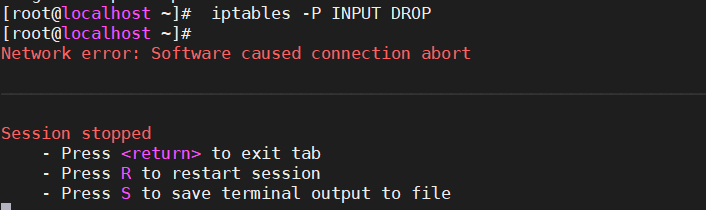
可以看到由于规则中没有过滤22端口,导致直接断联
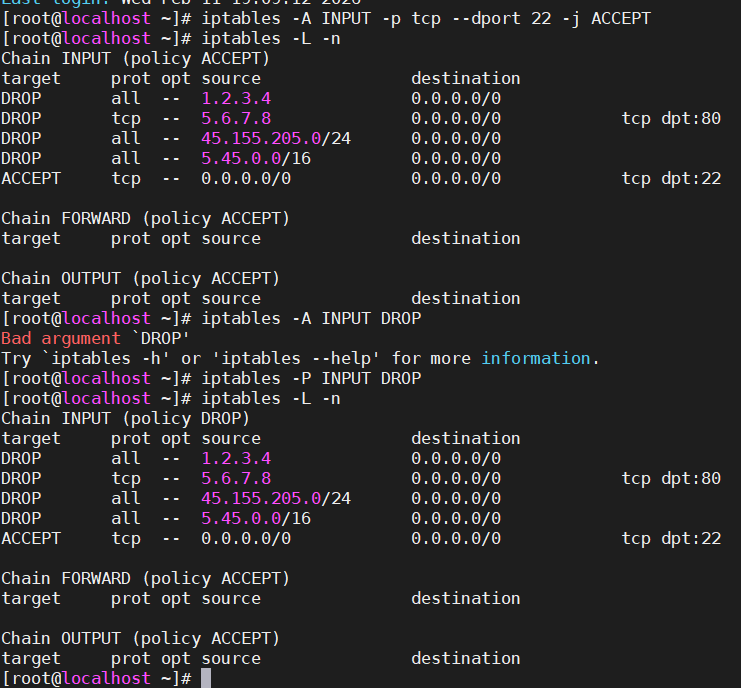
选择就完全没有问题了
针对ip/网络、网络接口、tcp,udp协议的过滤规则
iptables设置语法如下:
[root@localhost ~]# iptables [-t tables] [-AI 链] [-io 网络接口] [-p 协议] [-s 来源IP/网络] [-d 目标IP/网络] -j [ACCEPT|DROP|REJECT|REDIRECT]
-A 新增加一条规则,放到已有规则的最后面
-I 插入一条规则,如果没有制定插入规则的顺序,则新插入的变成第一条规则
-i 指定数据包进入的那个网络接口。linux下常见的有eth0、eth1、lo等等。此参数一般与INPUT链配合使用
-o 指定数据包传出的那个网络接口。经常与OUTPUT链配合使用
-p 指定此规则适用的协议,常用的协议有tcp、udp、icmp以及all
-s 指定来源IP或者网络,也就是限定数据包来源的IP或者网络,可以单独指定某个IP,也可以指定某段网络
-d 指定目标IP或者网络,跟参数“-s”类似
-j 此参数后面指定要执行的动作,主要的动作有接受(ACCEPT)、抛弃(DROP)及记录(LOG)
ACCEPT 接受该数据包
DROP 直接丢弃该数据包,不给客户端任何回应。
-m 指定iptables使用的扩展模块,常用的有tcp模块等
–sport 端口范围 限制来源的端口号码,端口号码可以是连续的,例如 1024:65535
–dport 端口范围 限制目标的端口号码
iptables 过滤规则实战案例(基于你的语法)
一、针对IP/网络的过滤
1.1 封禁单个恶意IP
# 封禁 1.2.3.4 所有访问
iptables -A INPUT -s 1.2.3.4 -j DROP

# 封禁 5.6.7.8 访问本机80端口
iptables -A INPUT -p tcp --dport 80 -s 5.6.7.8 -j DROP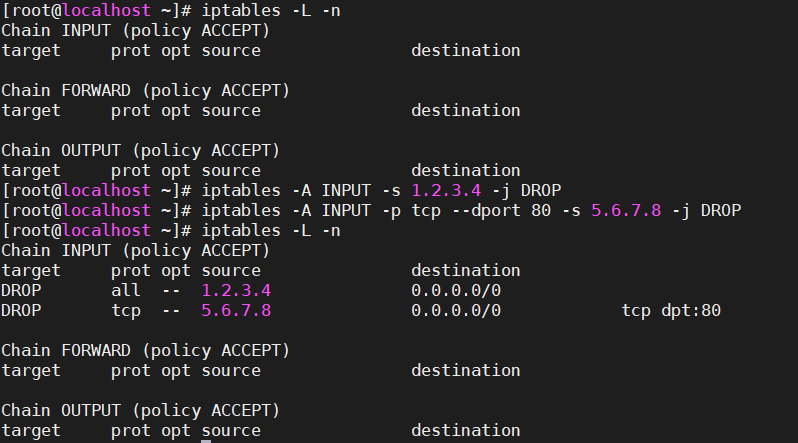
1.2 封禁整个网段
# 封禁香港某段IP
iptables -A INPUT -s 45.155.205.0/24 -j DROP

# 封禁俄罗斯垃圾扫描段
iptables -A INPUT -s 5.45.0.0/16 -j DROP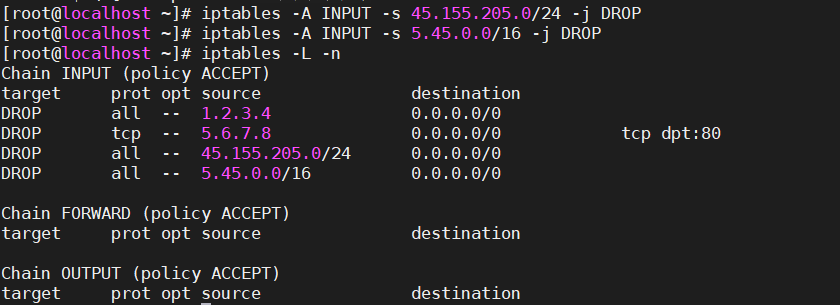
1.3 只允许内网访问
# 仅允许10.0.0.0/8访问MySQL(3306)
iptables -A INPUT -p tcp --dport 3306 -s 10.0.0.0/8 -j ACCEPT
iptables -A INPUT -p tcp --dport 3306 -j DROP

# 仅允许办公室IP访问SSH
iptables -A INPUT -p tcp --dport 22 -s 221.221.0.100 -j ACCEPT
iptables -A INPUT -p tcp --dport 22 -j DROP
二、针对网络接口的过滤
2.1 只允许内网网卡访问
# eth1是内网网卡,允许所有内网访问
iptables -A INPUT -i eth1 -j ACCEPT

#允许局域网内192.168.60.0/24的所有主机访问我们这个服务器,除了192.168.60.3这台主机:[root@localhost ~]#iptables -A INPUT -i eth1 -s 192.168.60.3  -j DROP
[root@localhost ~]#iptables -A INPUT -i eth1 -s 192.168.60.0/24 -j  ACCEPT

# eth0是外网网卡,严格限制
iptables -A INPUT -i eth0 -p tcp --dport 80 -j ACCEPT
iptables -A INPUT -i eth0 -j DROP
2.2 本机回环接口(必须放行)
# lo接口完全信任,不顾接收还是发送
iptables -A INPUT -i lo -j ACCEPT
iptables -A OUTPUT -o lo -j ACCEPT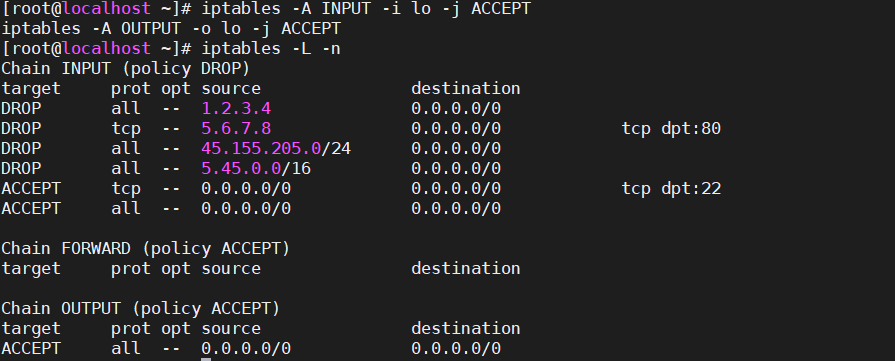
2.3 Docker/容器场景
# docker0接口完全放行(容器通信)
iptables -A INPUT -i docker0 -j ACCEPT
iptables -A FORWARD -i docker0 -j ACCEPT
三、针对TCP/UDP协议的端口过滤
3.1 Web服务(TCP)
# 开放80和443
iptables -A INPUT -p tcp --dport 80 -j ACCEPT
iptables -A INPUT -p tcp --dport 443 -j ACCEPT

# 限制并发连接数(防CC)
iptables -A INPUT -p tcp --dport 80 -m connlimit --connlimit-above 100 -j DROP
3.2 SSH安全加固(TCP)
# 改端口后开放
iptables -A INPUT -p tcp --dport 52222 -j ACCEPT

# 限制IP段(仅公司访问)
iptables -A INPUT -p tcp --dport 52222 -s 116.228.0.0/16 -j ACCEPT
iptables -A INPUT -p tcp --dport 52222 -j DROP

# 防暴力破解(60秒4次)
iptables -A INPUT -p tcp --dport 52222 -m state --state NEW -m recent --set
iptables -A INPUT -p tcp --dport 52222 -m state --state NEW -m recent --update --seconds 60 --hitcount 4 -j DROP
3.3 DNS服务(UDP)
# 开放DNS查询
iptables -A INPUT -p udp --dport 53 -j ACCEPT
iptables -A INPUT -p tcp --dport 53 -j ACCEPT  # DNS也用TCP做大查询

# 防DNS放大攻击(限制频率)
iptables -A INPUT -p udp --dport 53 -m limit --limit 10/s -j ACCEPT
iptables -A INPUT -p udp --dport 53 -j DROP
3.4 NTP时间同步(UDP)
# 开放NTP(123端口)
iptables -A INPUT -p udp --dport 123 -j ACCEPT

# 只允许内网NTP服务器
iptables -A INPUT -p udp --dport 123 -s 10.0.0.2 -j ACCEPT
iptables -A INPUT -p udp --dport 123 -j DROP
四、端口范围与多端口
4.1 连续端口范围
# 开放1024-65535高端口(P2P、FTP被动模式)
iptables -A INPUT -p tcp --dport 1024:65535 -j ACCEPT

# 开放30000-50000给RTP媒体流
iptables -A INPUT -p udp --dport 30000:50000 -j ACCEPT
4.2 多端口(非连续)
# 开放常见Web服务端口
iptables -A INPUT -p tcp -m multiport --dports 80,443,8080,8443 -j ACCEPT

# 开放内部服务端口集
iptables -A INPUT -p tcp -m multiport --dports 3306,6379,9200 -s 10.0.0.0/8 -j ACCEPT
五、综合实战案例(企业级)
5.1 Web服务器完整规则
#!/bin/bash
# Web服务器防火墙规则

# 默认策略
iptables -P INPUT DROP
iptables -P FORWARD DROP
iptables -P OUTPUT ACCEPT

# 本机通信
iptables -A INPUT -i lo -j ACCEPT

# 已建立连接放行
iptables -A INPUT -m state --state ESTABLISHED,RELATED -j ACCEPT

# ---------- 外网访问 ----------
# SSH(改端口+IP限制)
iptables -A INPUT -i eth0 -p tcp --dport 52222 -s 116.228.0.0/16 -j ACCEPT

# Web服务
iptables -A INPUT -i eth0 -p tcp -m multiport --dports 80,443 -j ACCEPT

# ---------- 内网访问 ----------
# 内网全放行(信任)
iptables -A INPUT -i eth1 -s 10.0.0.0/8 -j ACCEPT
iptables -A INPUT -i eth1 -s 172.16.0.0/12 -j ACCEPT
iptables -A INPUT -i eth1 -s 192.168.0.0/16 -j ACCEPT

# ---------- 防攻击 ----------
# SSH防爆破
iptables -A INPUT -p tcp --dport 52222 -m state --state NEW -m recent --set
iptables -A INPUT -p tcp --dport 52222 -m state --state NEW -m recent --update --seconds 60 --hitcount 4 -j DROP

# 限制ICMP(防ping flood)
iptables -A INPUT -p icmp --icmp-type echo-request -m limit --limit 1/s -j ACCEPT
iptables -A INPUT -p icmp --icmp-type echo-request -j DROP

# 记录被拒绝的
iptables -A INPUT -j LOG --log-prefix "IPT-DROP: " --log-level 4
5.2 数据库服务器(仅内网)
# MySQL只允许内网应用服务器访问
iptables -A INPUT -p tcp --dport 3306 -s 10.0.1.0/24 -j ACCEPT
iptables -A INPUT -p tcp --dport 3306 -j DROP

# Redis只允许内网
iptables -A INPUT -p tcp --dport 6379 -s 10.0.0.0/8 -j ACCEPT
iptables -A INPUT -p tcp --dport 6379 -j DROP
六、常用调试命令
# 查看当前规则(带行号)
iptables -L -n -v --line-numbers

# 查看某条链
iptables -L INPUT -n -v

# 查看NAT规则
iptables -t nat -L -n

# 删除规则(按行号)
iptables -D INPUT 3

# 插入规则(插到第1条)
iptables -I INPUT 1 -p tcp --dport 80 -j ACCEPT

# 测试连通性
telnet 服务器IP 80
curl -I http://服务器IP
七、一句话速记
-s 封IP,-i 锁网卡,-p 选协议,–dport 控端口
内网全放行,外网只开80/443/SSH
DROP是王道,LOG帮调试,ACCEPT要精确
针对数据状态模块的过滤规则
数据状态模块机制是iptables中特殊的一部分,严格来说不应该叫状态机制,因为它只是一种连接跟踪机制。连接跟踪可以让filter table知道某个特定连接的状态。
[root@localhost ~]# iptables -A INPUT -m state/mac –state NEW/ESTABLISHED/RELATED/INVALID
-m iptables的几个模块选项,常见的有:
state:状态模块
mac:网卡硬件地址(hardware address)
–state 一些数据封包的状态,主要有:
NEW:某个连接的第一个包。
ESTABLISHED:表示该封包属于某个已经建立的链接。
RELATED:当一个连接和某个已处于ESTABLISHED状态的连接有关系时,就被认为是RELATED的了。
INVALID:表示数据包不能被识别属于哪个连接或没有任何状态。
只要是已建立的连接或者相关数据包就予以通过,不能识别或者没有任何状态的数据包全部丢弃,设置如下规则:
[root@localhost ~]#iptables -A INPUT -m state –state RELATED,ESTABLISHED -j ACCEPT
[root@localhost ~]#iptables -A INPUT -m state –state INVALID -j DROP
# 规则1:放行已建立和相关的连接
iptables -A INPUT -m state --state RELATED,ESTABLISHED -j ACCEPT

# 规则2:丢弃无法识别的包
iptables -A INPUT -m state --state INVALID -j DROP
生产环境必写,几乎放在所有规则的最前面
四种状态详解(面试必考)
状态	含义	例子	处理
NEW	连接的第一个包	你访问百度,发出的SYN包	按具体端口规则处理
ESTABLISHED	已建立的连接	百度回包的SYN-ACK,后续数据包	✅ 直接放行
RELATED	相关连接	FTP数据通道、ICMP差错报文	✅ 直接放行
INVALID	无法识别/状态错误	伪造包、损坏包、无状态包	❌ 直接丢弃


为什么这两条规则至关重要?
没有状态模块时:
bash
# 你只开放了80端口
iptables -A INPUT -p tcp --dport 80 -j ACCEPT
iptables -P INPUT DROP

# 问题:百度返回的80端口包**源端口是80,目标端口是随机高端口**
# 不匹配 --dport 80,被DROP!
# 网页打不开!!!
有状态模块时:
bash
# 你访问百度: 你的随机端口 → 百度80 (NEW)
# 百度返回: 百度80 → 你的随机端口 (ESTABLISHED)
# ESTABLISHED 匹配,放行!

# ✅ 网页正常打开
完整生产顺序(非常重要)
bash复制下载
# 1. 放行已建立连接(必须放第一条!)
iptables -A INPUT -m state --state ESTABLISHED,RELATED -j ACCEPT

# 2. 放行本机回环
iptables -A INPUT -i lo -j ACCEPT

# 3. 丢弃无效包
iptables -A INPUT -m state --state INVALID -j DROP

# 4. 开放具体服务端口(按需)
iptables -A INPUT -p tcp --dport 22 -j ACCEPT   # SSH
iptables -A INPUT -p tcp --dport 80 -j ACCEPT   # HTTP
iptables -A INPUT -p tcp --dport 443 -j ACCEPT  # HTTPS

# 5. 默认拒绝所有
iptables -P INPUT DROP
🔴 顺序错,服务断!ESTABLISHED 必须在前!
为什么 iptables 规则一定要先放行 ESTABLISHED?
答:
1. 没有这条规则,回包会被默认策略DROP,业务全断
2. 这是无状态防火墙和有状态防火墙的核心区别
3. iptables 通过连接跟踪实现状态感知
4. 性能优化:ESTABLISHED 包直接放行,不用匹配后面几十条规则
一句话总结
ESTABLISHED,RELATED 放第一,INVALID 丢第二
NEW 按端口开放,其他全DROP
没状态模块,外网回不来;顺序错了,业务起不来
发表回复